
Unified Shipping with Ship Smart
 Photo by Bernd 📷 Dittrich on Unsplash
In Shopify, when a customer makes a purchase and the order needs to be fulfilled from multiple warehouses, the platform automatically calculates shipping as separate deliveries. This means that multiple shipping costs are generated from different warehouses to the customer’s address.
However, many merchants prefer to centralize orders in a single warehouse and make a single delivery. This can help reduce costs and prevent customers from being discouraged by high shipping fees. To solve this problem, we developed the Unified Shipping feature in our rate calculator Ship Smart.
How Does It Work?
When a customer reaches checkout and modifies their address, Shopify gives us 10 seconds to calculate the shipping cost. During that time, each warehouse involved in the order sends a request.
What we do in Ship Smart is calculate a total shipping cost and distribute it among the different requests evenly. This way, the final shipping cost is the same as if the order were shipped from a single location.
How to Set It Up?
Follow these steps to enable Unified Shipping in Ship Smart:
-
Configure this option directly in our Ship Smart app, available on the Pro plan.

-
In the settings, select the shipping cost option as “unified”.

-
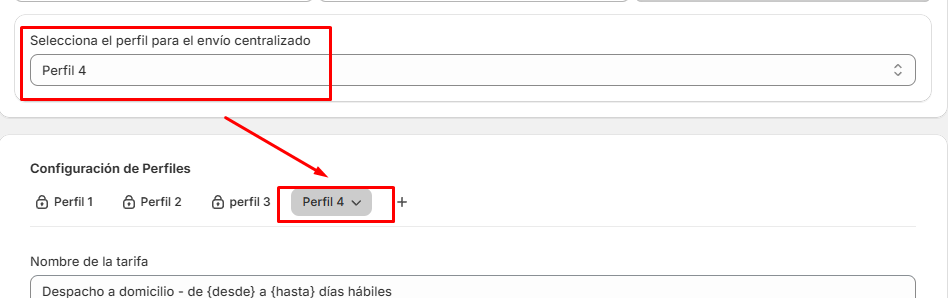
Select the profile that will be used to calculate shipping costs.
-
When choosing a profile, the other profiles can be edited but won’t appear in the shipping options visible to the customer.
Current Feature Challenges
Currently, Unified Shipping is not compatible with Shopify’s Split Shipping feature. This is because our system distributes shipping costs among the different requests to get a final total price. However, in Split Shipping, Shopify allows customers to select the shipping method for each product individually, which could generate unequal costs between products.
Conclusion
This feature is designed to help you increase sales in your Shopify store, preventing customers from abandoning their purchases due to high shipping costs.
If you need help setting up Ship Smart, contact us at [email protected]. We’re here to help!